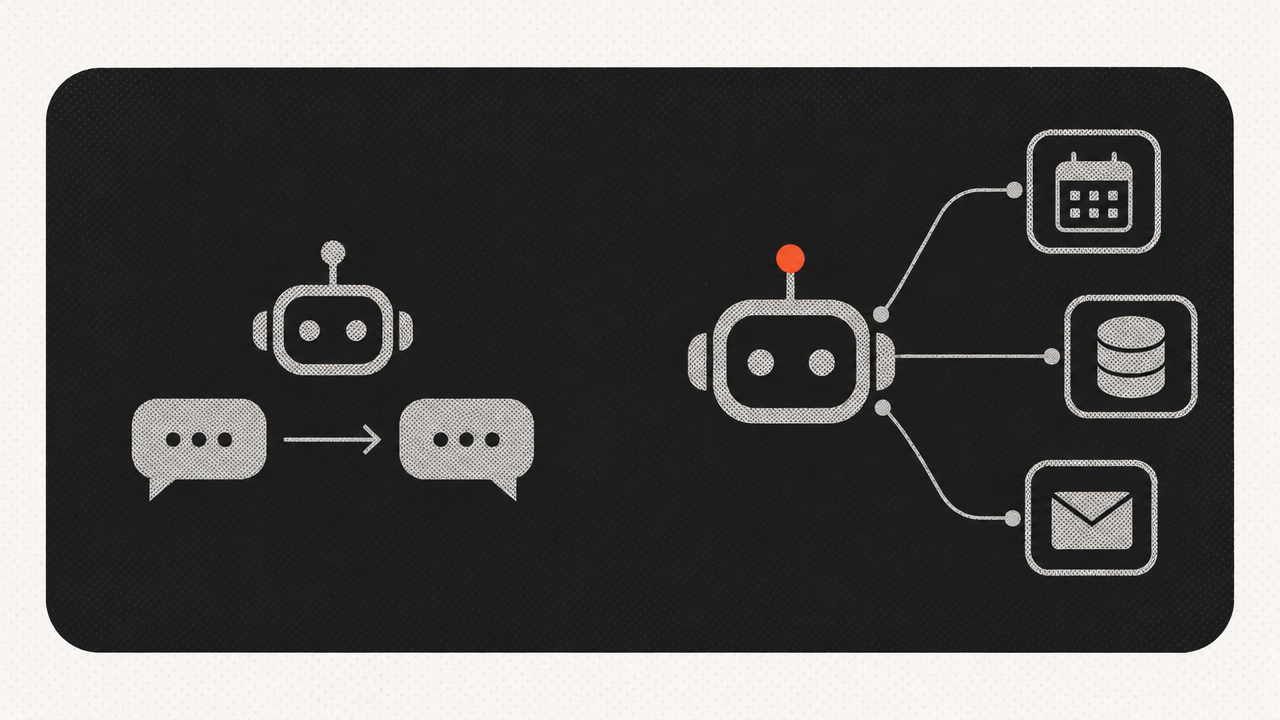
How is an AI agent different from a chatbot — or from typing into a chat assistant?
An AI agent is a program that is given a goal (“handle this inquiry,” “issue the invoice,” “check whether this item is in stock”), decides for itself which steps that goal requires, performs them inside your systems, and reports what it did.
Here is how it stacks up against the two tools most owners already know:
| Scripted chatbot | Chat assistant in a browser | AI agent | |
|---|---|---|---|
| Who drives the conversation | a fixed tree of buttons | you type every prompt yourself | the agent picks the next step |
| Access to your data | only what was hard-coded | nothing beyond what you paste in | reads CRM, price list, calendar, inbox |
| What happens after it answers | nothing | nothing | creates a ticket, updates a record, sends an email |
| How it typically breaks | the customer says something unexpected | nobody checked the facts | missing permissions, missing data, a vague goal |
The practical takeaway: a chatbot answers, a browser assistant helps you work faster, and an agent does part of the routine instead of a person. That is exactly why an agent needs integrations and access rules. Without them it is just another chat window.
Have a task you would like to hand to an agent? Discuss your task →
What can a small business hand to an agent right now?
Hand over the routine that repeats daily and has a clearly defined finished state. The usual candidates:
- First-touch handling of inquiries. The agent reads messages from email, web chat, and social inboxes, extracts the point, classifies the topic, creates a record in the CRM, and answers the simple questions outright.
- Stock, pricing, availability. “Do you have this, and when can I get it?” is checked against your inventory system and answered from live data rather than from memory.
- Documents. Reading invoices, delivery notes, and statements, then moving the amounts into your accounting system without manual typing.
- Deals nobody followed up on. The agent reviews stalled opportunities every day and either nudges the rep or sends a short follow-up itself.
- Internal lookups. Answering staff questions about your own policies, delivery terms, or warranty rules.
The pattern is consistent: agents land best where the volume of lookalike requests and SKUs is highest, because that is where a human spends the most time repeating herself.
Why do so many agent projects stall before they produce anything?
Most projects stall because nobody answered one question before the build started: which specific number is supposed to change? Gartner forecasts that more than 40% of agentic AI projects will be canceled by the end of 2027, driven by escalating costs, unclear business value, or inadequate risk controls8. The money side looks similar: in a 2026 KPMG report, 88% of organizations were already investing in AI, yet only about a quarter were seeing returns across several areas at once7.
What actually goes wrong on the ground:
- The data is scattered. An agent cannot confirm availability when stock levels live in three spreadsheets and the warehouse manager’s head.
- No process owner. When the agent gets something wrong, nobody is accountable for fixing the rules, and trust evaporates within a week.
- The task chosen was impressive, not painful. Generating social posts demos well but takes no load off your team.
- No handoff point. An agent has to be able to say “I don’t know” and pass the conversation to a human.
The first step is almost never the agent. It is order in the data: one product catalog, one source of stock levels, one CRM with the fields actually filled in.
Where does your data get processed, and can you keep it in-house?
Processing location is a choice, not a given. Cloud services with a proper data processing agreement are usually enough for ordinary work — handling inquiries, routing email, drafting replies. Running the model on your own hardware is the right call when you deal with medical, legal, or personal data that must not leave the building.
Self-hosting is no longer exotic. Open-weights models ship in several sizes, and a four-billion-parameter version quantized to four bits needs roughly 8 GB of RAM and runs without a dedicated graphics card21. That is a small office machine, not a server rack.
Whichever route you pick, write down which categories of data the agent touches and on what legal basis. Sooner or later a client, an auditor, or a regulator will ask, and reconstructing it afterwards is painful.
How do you limit what an agent is allowed to do?
Agent permissions are written on a least-privilege basis: every action it may take is listed explicitly, and everything not listed is forbidden. Autonomy creates its own class of risk — OWASP’s GenAI Security Project published a “Top 10 for Agentic Applications 2026” covering agent goal hijacking, tool misuse, memory poisoning, cascading failures, and rogue agents11.
A workable minimum for a small company:
- Separate reading from writing. The agent reads stock and customer history, but only drafts a document that a person approves.
- Hard limits on actions. No bulk sends, record deletions, or payments without confirmation.
- Log everything. Every step visible: what it read, what it changed, why it chose that path.
- Its own account. The agent never runs under the owner’s or the director’s credentials.
On the plumbing side, connecting agents to your systems is becoming standardized. The Model Context Protocol (MCP) is an open standard for connecting AI agents to external tools and data, introduced by Anthropic in November 2024; in December 2025 the Linux Foundation created the Agentic AI Foundation, with MCP as one of its founding projects10. In plain terms: you are less likely to be locked into one vendor’s custom connectors than you were a year or two ago.
How do you tell whether the agent is paying off?
Payback is measured against one or two numbers you recorded before launch. Without that baseline, any result looks convincing, and that is the single biggest source of disappointment later.
Worth writing down in advance:
- how many inquiries arrive per day, and what share of them are near-identical;
- how long it takes from inquiry to first reply;
- how many requests are lost outside business hours;
- how many hours a week staff spend retyping data from one system into another;
- the share of conversations the agent closes without a human.
The effect, when it shows up, rarely comes from “an agent” in general. It comes from one precisely chosen process where the routine disappeared completely.
Who doesn’t need an AI agent?
Walking away is the right answer in at least four situations.
You don’t have enough lookalike requests. If a handful of inquiries arrive each day and every one is different, a person will handle them faster and cheaper than you can describe the rules.
Your data isn’t organized. When stock, prices, and customer contacts live in messaging apps and a notebook, the agent will simply broadcast the chaos faster. Single source of truth first.
The process isn’t documented even for humans. If two reps handle the same request differently and nobody knows which way is correct, there is nothing to automate yet.
The cost of an error is high and there’s no review step. Medical advice, legal conclusions, and financial transactions don’t go to an agent without mandatory human sign-off.
One more honest note: an agent does not replace a salesperson. It removes the routine — quotes, reminders, the first layer of repeat questions — and leaves the human the part that requires judgment and accountability. Gartner expects that by 2028 at least 15% of day-to-day work decisions will be made autonomously through agentic AI, up from none in 2024, and that 33% of enterprise software applications will include agentic AI, up from under 1%9. That is a share of the decisions, not the job.
Read also: